Part 3 - ASAM MDF4 Explained
In Part 2 of our ASAM MDF4 Explained series, we looked inside an MDF4 file and explored the blocks used to organize channels, channel groups, conversions, metadata, and measurement data. But storing a measurement is only half the story.
When an engineer opens an MDF4 file and sees a graph showing engine speed in rpm, temperature in °C, or pressure in bar, the values on screen may not be identical to the values originally stored in the measurement record.
MDF4 provides the information needed to transform recorded data into meaningful engineering signals and place those signals in the correct relationship to time. Let's follow that journey.
It Starts with a Recorded Value
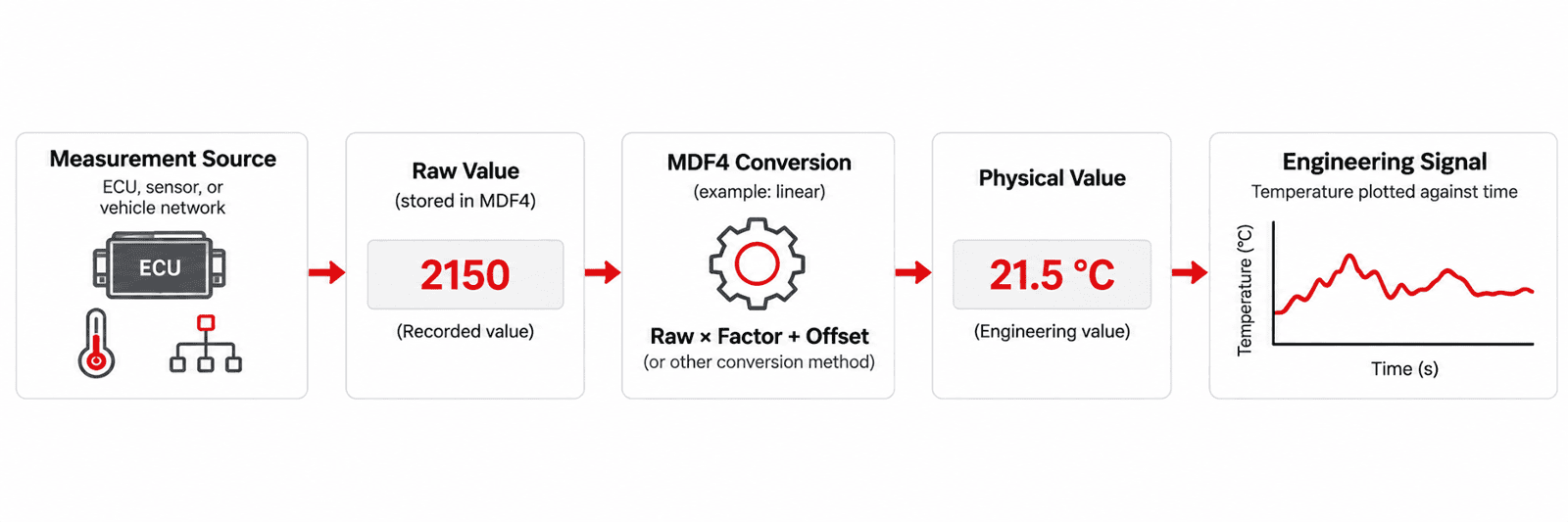
Measurement systems often acquire data from several sources, including ECUs, sensors, and vehicle networks.
What gets recorded may be a raw value, meaning the value is stored in the form provided by the measurement source rather than as the final engineering value an engineer expects to see.
For example, imagine a temperature measurement stored as: 2150
On its own, 2150 does not tell us whether the measurement represents degrees Celsius, degrees Fahrenheit, voltage, resistance, or something else.
The MDF4 channel description provides context about the signal and can associate the stored value with a conversion rule. That rule tells compatible analysis software how to turn the raw value into its physical, human-readable form. ASAM MDF supports raw values and corresponding conversion rules specifically so the original representation can be stored efficiently and interpreted later.
Raw Values and Physical Values
MDF4 distinguishes between the value stored in the measurement record and the physical value produced after a conversion is applied.
The raw value is the encoded value stored in the record.
The physical value is the meaningful result after any required conversion has been performed.
The relationship does not always need to be complicated. A common example is a linear conversion:
Physical Value = Factor × Raw Value + Offset
But MDF4 supports considerably more than simple scaling. Conversion rules can include linear and algebraic formulas, rational conversions, lookup tables, ranges, and conversions between numeric values and text.
That last capability is useful when a recorded numeric value actually represents a state.
For example:
0 → Off
1 → On
2 → Error
Instead of requiring the analysis application to already know what those numbers mean, that interpretation can travel with the measurement data.
Why Store Raw Data at All?
If engineers ultimately want physical values, why not convert everything before it is recorded?
There are several advantages to preserving raw values.
Raw data can be stored in compact data types, potentially reducing the amount of storage required. It can also allow a measurement system to record incoming data without spending additional processing time converting every value during acquisition.
The conversion can then be applied during offline analysis.
ASAM also notes that this approach can allow chunks of data received from an ECU or bus message to be stored without first extracting and converting every individual signal.
In other words, MDF4 can separate two jobs:
Recording what happened and Interpreting what it means
That can be particularly valuable when dealing with high channel counts and high data rates. A Signal Also Needs Time
Knowing that a temperature was 21.5 °C is useful.
Knowing when it was 21.5 °C is much more useful.
Measurement analysis depends on the relationship between values and their position within a measurement sequence. In most vehicle testing applications, that means time.
MDF4 uses master channels to establish this relationship.
A master channel provides the synchronization reference for the other channels associated with it. Time is the most common reference, but MDF4 can also use synchronization domains such as angle, distance, or index depending on the measurement.
For a time-based measurement, the result can be thought of simply as:
Time + Value
For example:
| Time | Engine Speed |
| 0.000 s | 1,502 rpm |
| 0.001 s | 1,507 rpm |
| 0.002 s | 1,515 rpm |
| 0.003 s | 1,521 rpm |
Those timestamps give the samples their position within the test.
Not Everything Is Measured at the Same Rate
Real-world measurement systems rarely collect every signal at exactly the same frequency.
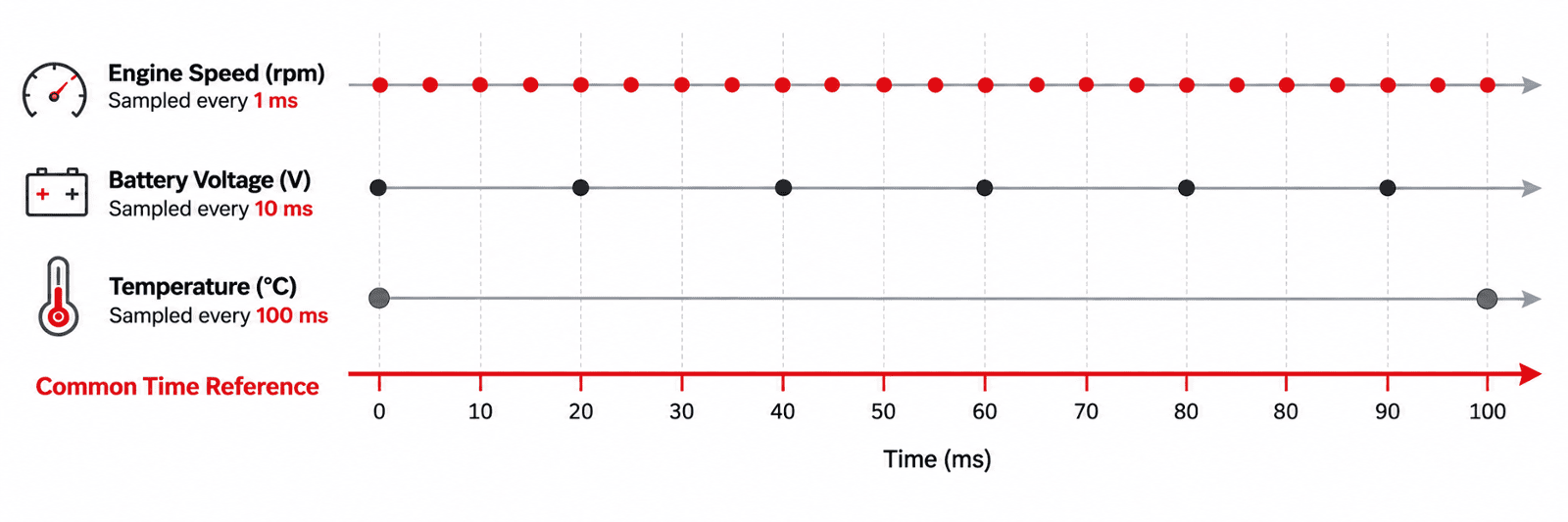
An ECU parameter might be acquired every millisecond, while a temperature sensor might only need to be sampled every 100 milliseconds. Other measurements may arrive irregularly rather than at a fixed interval.
MDF4 supports both multiple sampling rates and non-periodic sampling within the same file.
This is important because MDF4 does not need to artificially duplicate slower measurements simply to make them fit the fastest signal in the recording.
Consider two signals recorded during the same test:
Engine Speed: every 1 ms
|•|•|•|•|•|•|•|•|•|•|
Battery Voltage: every 10 ms
|•| |•|
Both describe the same test period, but they do not contain the same number of samples.
Synchronizing Different Signals
Different sampling rates create an obvious analysis question:
How can signals recorded at different rates be compared?
This is where synchronization becomes important.
Master channels establish the reference that allows samples and events to be ordered according to when they occurred. Signals do not have to contain matching sample counts to belong to the same overall measurement timeline.
Imagine an engineer investigating an unexpected engine event.
Engine speed may have been sampled rapidly. Temperature may have been sampled more slowly. CAN messages may have arrived according to their own transmission timing.
The samples are different, but their timing information allows analysis software to present them in the proper temporal relationship.
That lets an engineer ask useful questions such as:
What happened to throttle position immediately before engine speed changed?
Did temperature begin increasing before or after the event?
Which network message occurred at the same point in the test?
The value tells you what happened. The synchronization information helps tell you when it happened relative to everything else.
From MDF4 File to the Graph on Screen
Putting everything together, there is more happening behind a graph than may initially appear.
A simplified process looks like:
1. Locate the channel
The MDF4 structure describes the signal and where its values are stored.
2. Read the recorded values
The appropriate samples are retrieved from the measurement data.
3. Apply the conversion
If required, the raw values are converted into physical engineering values.
4. Associate the samples with the master channel
The values are placed against their synchronization reference, typically time.
5. Present the engineering signal
The analysis application can now display the measurement using its appropriate values, units, and timing.
Most of this happens automatically when engineers open an MDF4 recording in compatible analysis software.
Where VISION Data Analyzer Fits
This is also where the distinction between the MDF4 standard and an MDF4 analysis tool becomes useful.
MDF4 defines how the measurement and the information required to interpret it can be stored. Analysis software uses that information to present the data in a form engineers can actually work with.
For example, ATI VISION Data Analyzer (VDA) provides native support for ASAM MDF4 files, including files generated by third-party systems. Engineers can visualize signal data using graphs and tables, inspect individual values with cursors, and work with multiple recordings during analysis.
The important point is that the useful engineering signal does not exist independently of its context. The value, conversion, unit, and timing information all contribute to what an engineer ultimately sees.
Why This Matters
It can be easy to think of an MDF4 recording as a collection of signal names and values.
Underneath, MDF4 is preserving the information necessary to turn recorded data into something meaningful.
A stored number can become a physical measurement.
Samples collected at different rates can remain synchronized.
Values from different measurement sources can be placed into the context of the same test.
And because the information needed to interpret those measurements can travel with the file, the data can remain useful long after the original test has ended. That is a major part of what makes MDF4 valuable as a measurement data format.
What's Next: Why MDF4 Works for Large and Complex Measurement Data
As channel counts, sampling rates, and test durations increase, measurement files can become extremely large.
So how does MDF4 handle all that data without turning every recording into an unmanageable file?
In Part 4 of our ASAM MDF4 Explained series, we'll look at how MDF4 approaches large datasets, including data organization, compression, and some of the considerations involved in efficiently reading and analyzing large measurement files.